On-Page SEO for Small Businesses: All You Really Need
Your website doesn’t rank. You have content, links - but Google doesn’t show you.
The problem? 90% of SMEs make the same On-Page SEO mistakes. And here’s the best part: 90% of these mistakes can be fixed in 20 minutes.
I’m writing this guide not as a technical SEO expert, but as someone who REALLY works with small businesses. No expensive SEO tools. No complex technical knowledge. Just your website editor and 7 proven steps for better rankings.
This is practical On-Page SEO for SMEs - honest, beginner-friendly, immediately actionable.
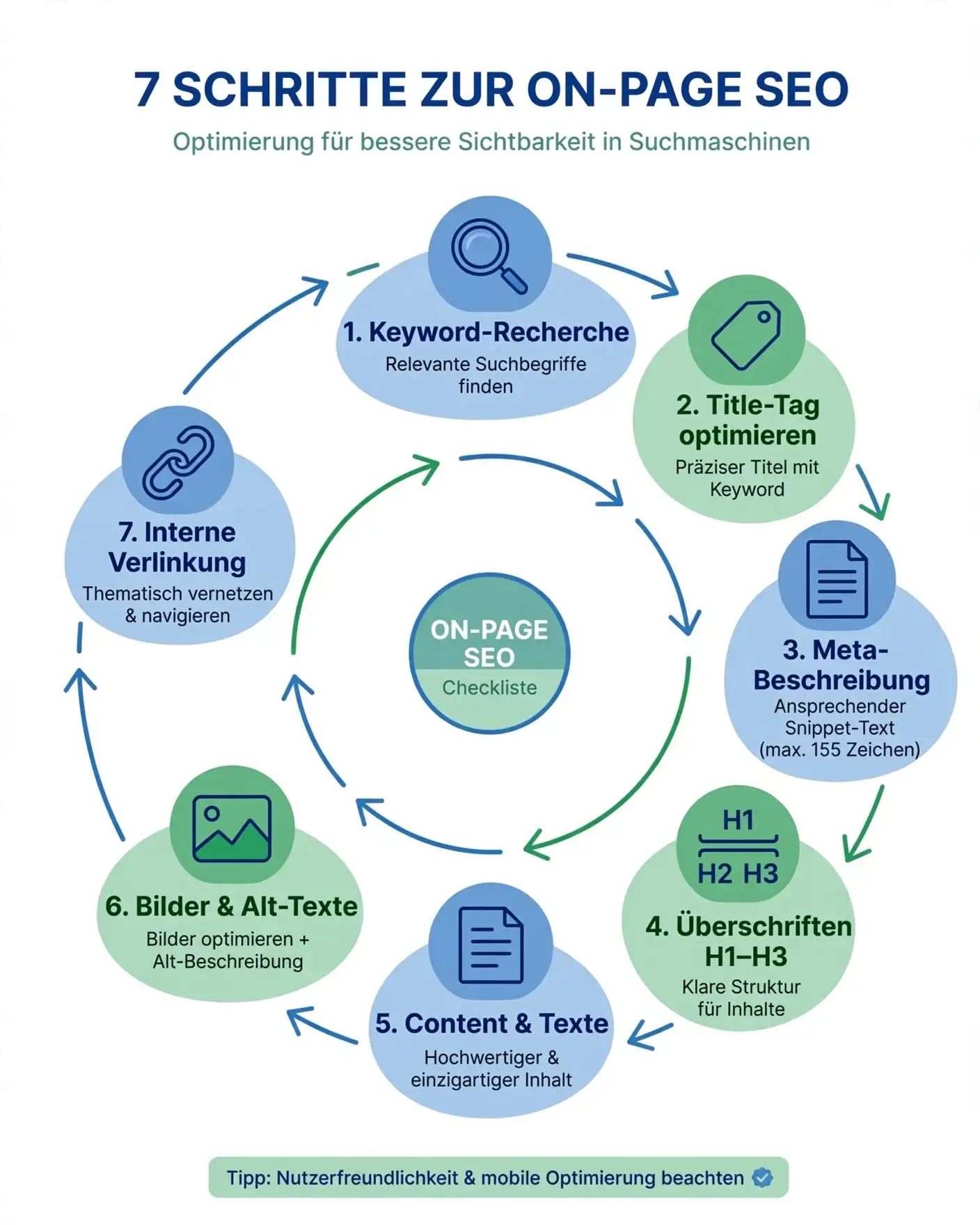
Why On-Page SEO for Small Businesses is NOT Optional
Hold on. Let me clarify what On-Page SEO actually is.
On-Page SEO = Everything you optimize ON your website. Off-Page SEO = Backlinks, Social Media, external factors.
Why is On-Page important?
Because Google reads it FIRST.
Google crawls your website and sees:
- What is your title?
- What is your meta description?
- Where are keywords placed?
- What’s the structure?
If that’s chaos = Google sees: “This is unclear, I don’t know what this is about.” If that’s perfect = Google sees: “OK, this is a page about ‘web design for small businesses’, I can rank this.”
The Statistics:
According to Backlinko’s study, the top ranking factors are:
- Backlinks (40%)
- RankBrain/User Signals (21%)
- On-Page Content Quality (16%)
- Domain Authority (8%)
- Mobile Friendliness (5%)
= 16% is MASSIVE! That’s one of the TOP-3 ranking factors!
And the best part? You have 100% control over On-Page SEO. You don’t need an agency. You don’t need a budget. You just need your website editor.
The 7 On-Page SEO Steps (Step by Step)
Step 1: Optimize Your SEO Title
Your title is the first thing Google sees.
It’s also the first thing Google ranks.
Requirements for a good SEO Title:
- Max. 60 characters (Google shows ”…” otherwise)
- Keyword at the beginning or end
- Emotionally appealing (Not robotic!)
- Click-Through-Rate optimized (People click on it!)
❌ WRONG:
“Web Design” (too generic!) “Web Design for Small Businesses Beginner Guide Tips Tricks” (Keyword Stuffing!) “Build Website” (Keyword missing!)
✅ RIGHT:
“Web Design for Small Businesses: Security Before Design” (57 characters!) “On-Page SEO: 7 Steps for Beginners (No Tools)” (50 characters!) “WordPress Speed Up: +40% Speed in 5 Minutes” (49 characters!)
POWER-WORDS that work:
- Numbers: “7 Ways”, “5 Minutes”, “500% More”
- Action: “Double”, “Start”, “Learn”
- Adjectives: “Fast”, “Easy”, “Secret”
- Curiosity: “You Should Have Known This Earlier”
HOW TO DO IT:
Go to your website editor (WordPress, Astro, etc.):
- Write your title
- Count the characters (max. 60!)
- Keyword at beginning or end?
- Test: Would I click on this?
COST: €0 (Your editor!)
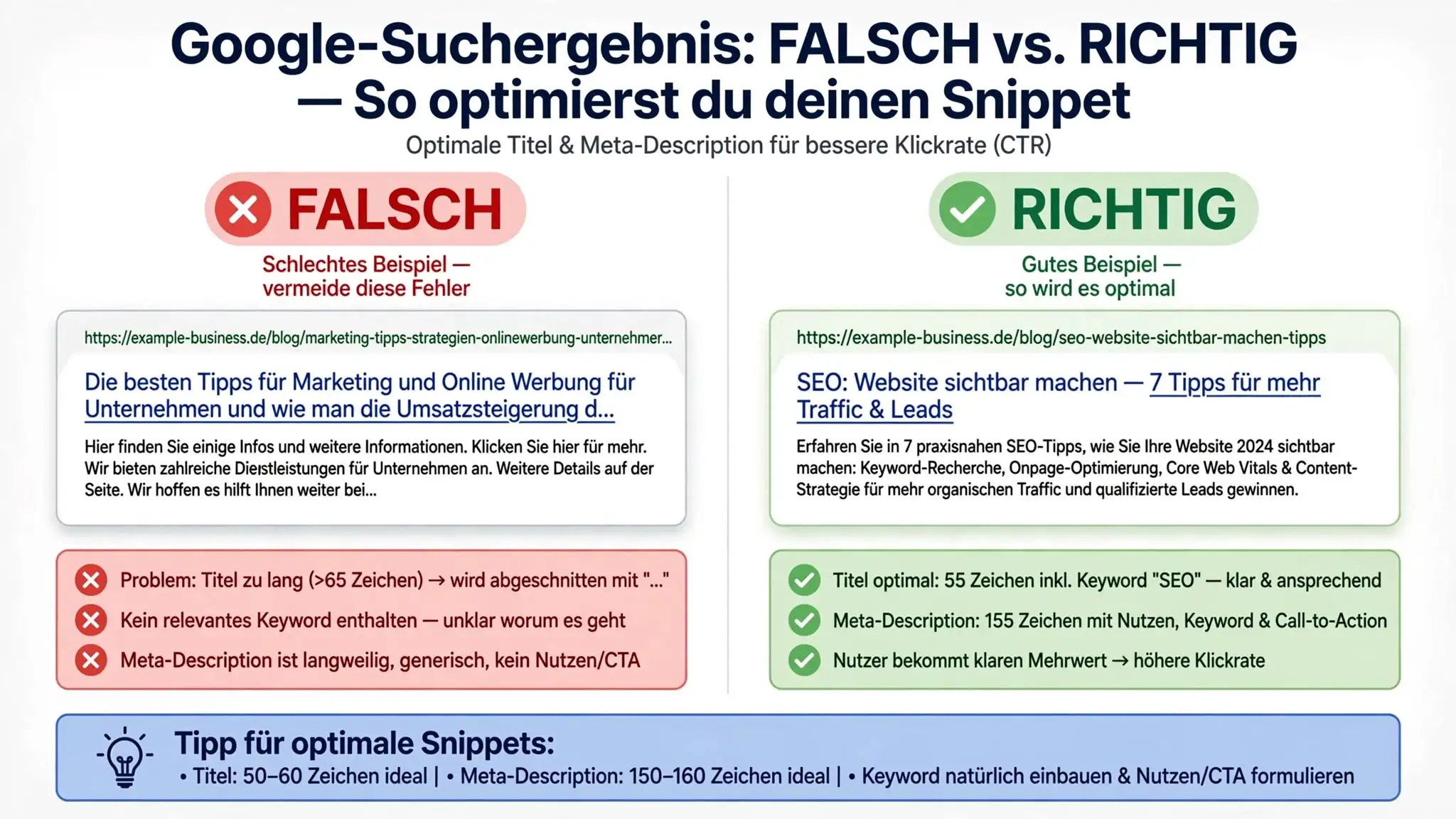
Step 2: Write Meta Description
The meta description is the small snippet under your title on Google.
“Web Design for Small Businesses: Do you need a website? Here I show you why security comes before design…”
That’s meta description.
Requirements:
- 150-160 characters (Google shows shortened otherwise!)
- Concrete problem + solution
- Imply call-to-action (“Here I learn…” / “Let me…”)
- Address target audience directly (You, not “one”)
- Include keyword (Naturally, not forced!)
❌ WRONG:
“Learn more about web design in our article.” (Boring, no promise!) “Web design is important for success.” (Too vague!)
✅ RIGHT:
“Web Design for Small Businesses doesn’t have to be expensive. I show you why security comes before design, what it costs and how to get started. Honest & transparent!” (164 characters, problem + solution + promise)
TEMPLATE to copy:
“[YOUR NAME] shows: [CONCRETE PROBLEM]. With these [NUMBER] steps [CONCRETE SOLUTION]. [TIMEFRAME].”
Example: “Lars shows: Your blog gets 50 visitors/month. With these 7 On-Page SEO steps reach 500 in 3 months. Beginner-friendly + no tools.” (157 characters! Perfect!)
HOW TO DO IT:
- Open your website backend (WordPress: Yoast Plugin / Astro: Front-Matter)
- Write meta description
- Count characters (150-160!)
- Test: Would I CLICK on this if I saw it on Google?
COST: €0
Step 3: Perfect Your H1 Tag
Your H1 tag is the MAIN HEADING on the page.
Don’t confuse it with your SEO Title! These are two different things:
SEO TITLE (Browser Tab): "On-Page SEO for Small Businesses: 7 Steps"
H1 TAG (On the page): "On-Page SEO for Small Businesses: 7 Steps"
Ideally, they’re the SAME or very similar.
Requirements for H1:
- Keyword must be in it (At least 1x!)
- Should be same or similar to SEO Title
- Clear and understandable
- Not too long (< 70 characters ideal)
❌ WRONG:
H1: “Welcome to our blog” (Keyword missing!)
H1: “On-Page SEO for small businesses who want to start with SEO and don’t know where to begin…” (Too long, unclear!)
✅ RIGHT:
H1: “On-Page SEO for Small Businesses: 7 Steps (No Tools Needed)” (Keyword in, clear, snappy!)
HOW TO DO IT:
- Go to your website page (Edit-Mode)
- Find the H1 (Largest heading)
- Write it so it:
- Has your keyword
- Is clear
- Is snappy
COST: €0
Step 4: Place Keywords in H2 and H3
H2 and H3 are sub-headings.
H2 = Larger sub-headings (Main sections) H3 = Smaller sub-headings (Sub-sections)
Why this matters:
Google reads your heading structure like a table of contents:
H1: "On-Page SEO for Small Businesses"
  H2: "Step 1: Optimize SEO Title"
    H3: "Requirements for a good SEO Title"
  H2: "Step 2: Meta Description"
    H3: "Template to Copy"
Google sees: “OK, this post is about On-Page SEO, and it has steps and requirements.”
Keyword placement in headings:
✅ MUST have:
- H1: 1x main keyword
- At least 1 H2: Keyword or related keyword
✅ SHOULD have:
- 1-2 H3: Related keywords
- Don’t stuff EVERY heading with keyword!
❌ DON’T:
- H2: “On-Page SEO Beginner Tips for Small Businesses On-Page SEO”
- That’s Keyword Stuffing!
HOW TO DO IT:
- Write your headings naturally
- Check if keyword appears at least 1x in H2
- Don’t force it, keep it natural!
COST: €0
Step 5: First 100 Words - Place Your Keyword
Google reads the FIRST 100 WORDS of your post like an abstract.
If you have your keyword in the first 100 words = Google immediately knows what it’s about!
Requirement:
- Your main keyword at least 1x in the first 100 words
- Naturally built in, not forced!
❌ WRONG:
“On-Page SEO is important. On-Page SEO for small businesses is easy. If you learn On-Page SEO, you’ll succeed. On-Page SEO, On-Page SEO, On-Page SEO.” (Keyword Stuffing! Sounds unnatural!)
✅ RIGHT:
“Your website doesn’t rank. Your content is good, but Google doesn’t show you. The problem? Often the mistake is ON YOUR WEBSITE. 90% of small businesses make the same On-Page SEO mistakes. I show you the 7 most concrete steps.” (Keyword 1x naturally included!)
HOW TO DO IT:
- Write your intro section (Normally, not forced!)
- Count the first 100 words
- Does your keyword appear at least 1x? If NOT: Add it naturally
- Done!
COST: €0
Step 6: Set Internal Links Strategically
Internal links = Links to YOUR other posts/pages.
Why important?
- Users can discover more articles (More engagement!)
- Google sees your website structure (Better rankings!)
- You can pass “link juice” from strong to weak pages
Requirements:
- At least 3 internal links per post (Per 1000 words = 1 link)
- Links should be RELEVANT (Not random!)
- Anchor text should have keyword or context
❌ WRONG:
“Read our article” (Vague anchor text!) “Read our article here” (Even vaguer!) “Click here for WordPress setup guide” (Where? What’s WordPress setup?)
✅ RIGHT:
“I wrote a detailed post about Web Design for Small Businesses” (Relevant anchor text + clear target!)
“If you want to go deeper, I recommend our Website Security Guide” (Natural, relevant!)
HOW TO DO IT:
- Read your finished post
- Think: Which other posts of mine are relevant?
- Set 3-5 links naturally
- Anchor text should be meaningful
- Not too many links (Looks like spam!)
COST: €0
Step 7: Optimize ALT-Texts + Images
ALT-Text = Description of an image for Google + people with visual impairment.
If Google can’t see the images, it reads the ALT-text!
Requirements for ALT-Text:
- Descriptive (What’s in the image?)
- Keyword can be in it (But not forced!)
- Short (< 125 characters)
- Not “Image1.jpg” or “Screenshot” - That’s worthless!
❌ WRONG:
ALT: “Image” ALT: “Screenshot” ALT: “On-Page SEO for small businesses On-Page SEO on-page-seo small-businesses beginner” (Keyword Stuffing!)
✅ RIGHT:
ALT: “Laptop with website editor: On-Page SEO elements like title, meta, keywords are marked” (Descriptive, keyword natural, not forced!)
ALT: “On-Page SEO checklist: 7 points to check for better rankings” (Descriptive + keyword)
HOW TO DO IT:
- Open your image editor (WordPress Media or Astro)
- Enter meaningful ALT-text
- Describe WHAT’S in the image
- Add keyword naturally (Optional!)
- Done!
COST: €0
Common On-Page SEO Mistakes (And How to Avoid Them)
❌ Mistake 1: No Keyword in the H1
❌ H1: “Welcome to our blog” Google sees: “Hmm, what’s this about?”
✅ H1: “On-Page SEO for Small Businesses: 7 Steps” Google sees: “Ah, On-Page SEO for SMEs. I can rank this!”
Fix: Always write H1 with keyword!
❌ Mistake 2: Keyword Stuffing
❌ “On-Page SEO for small businesses and On-Page SEO for beginners and On-Page SEO tips and On-Page SEO SMEs”
Google sees: “That looks like spam!” → Ranking penalty!
✅ Write naturally, keyword only 1-2x per 1000 words
Fix: Read your text aloud. Does it sound natural? If NOT: Rephrase!
❌ Mistake 3: Titles Too Long or Too Short
❌ Title: “Web Design” (Too short, no keyword context!) ❌ Title: “Web Design for Small Businesses in Germany for Beginners Who Are New” (Too long, Google shows only 60 characters!)
✅ Title: “Web Design for Small Businesses: Security Before Design” (57 characters!)
Fix: Always 50-60 characters! Use Google preview test!
❌ Mistake 4: No Internal Links
❌ Post without links → User leaves website ❌ New posts without links from established posts
Google sees: “That’s a lonely island, not connected to the rest!”
✅ At least 3-5 relevant internal links
Fix: Search for links! “Which existing posts are relevant?”
❌ Mistake 5: Forgotten ALT-Texts
❌ ALT: "" (Empty!) ❌ ALT: “123.jpg” (Pointless!)
✅ ALT: “Laptop with website editor: On-Page SEO elements”
Fix: Always enter ALT-text! Google + people with visual impairment thank you!
Your On-Page SEO Checklist
Print this out and use it for EVERY new post!
THIS WEEK - BEFORE PUBLISH:

☐ SEO Title written
  ☐ 50-60 characters?
  ☐ Keyword at beginning or end?
  ☐ Would I click on this?

☐ Meta Description written
  ☐ 150-160 characters?
  ☐ Problem + solution + promise?
  ☐ Address target audience (You, not "one")?

☐ H1 optimized
  ☐ Keyword in it?
  ☐ Similar to SEO Title?

☐ H2/H3 structure checked
  ☐ At least 1 H2 with keyword?
  ☐ Heading hierarchy clean?

☐ First 100 words checked
  ☐ Keyword at least 1x?
  ☐ Built in naturally?

☐ Internal links set
  ☐ At least 3 links?
  ☐ Relevant posts linked?
  ☐ Anchor text meaningful?

☐ Image ALT-texts
  ☐ All images have ALT-text?
  ☐ Descriptive (not "Image")?
  ☐ Keyword naturally included?

☐ Final check
  ☐ Grammar + spelling?
  ☐ Links working?
  ☐ Images loading fast?
FAQ - Frequently Asked Questions
Q: Do I need an SEO tool for On-Page optimization?
A: NO! That’s the best part: You need ZERO tools. Just your website editor. Yoast SEO (WordPress) helps if you want - it’s free!
Q: How long until my post ranks?
A: Honestly? 2-4 weeks until Google crawls it. 2-3 months until rankings are stable. Patience is SEO!
Q: Keyword density - How often should the keyword appear?
A: 1-2% is optimal. 1000 words = keyword 10-20x. Not less, not more!
Q: What’s the difference between On-Page and Off-Page SEO?
A:
- On-Page = What you do ON your website (Title, keywords, content, links)
- Off-Page = What OTHERS say about your website (Backlinks, reviews, social)
You need On-Page first!
Q: Can I improve my old posts with this checklist?
A: YES! That’s even smart! Go through old posts, optimize title + meta + keywords. Google will thank you!
Your Next Step
Here are your options:
Option 1: Use the checklist and optimize your next post yourself.
Option 2: Let me analyze your website - I show you exactly which On-Page mistakes you’re making.
Conclusion: On-Page SEO for Small Businesses is NOT Complicated
On-Page SEO looks complicated when you hear from big agencies.
“Crawl budget”, “Schema Markup”, “E-E-A-T”, “TF-IDF”, “LSI Keywords”…
STOP!
That’s overkill for small businesses.
The TRUTH:
- Good title + meta description
- Keyword in H1, H2, first 100 words
- Internal links
- ALT-texts
= That’s 90% of ranking!
Everything else is just bonus.
You don’t need BUDGET. You don’t need TOOLS. You JUST need these 7 steps.
If you’re ready to improve your rankings:
→ Let me analyze your website for free!
I show you exactly where the On-Page mistakes are.
Or if you have questions:
→ Book a free appointment with me!
I help you optimize your website.
I’m waiting for you! 🚀
Sources & Further Resources
This post is based on data from trusted sources:
SEO Studies & Authorities:
- Backlinko: Google Ranking Factors
- Google Search Central: On-Page SEO
- Moz: On-Page SEO Guide
- HubSpot: SEO Best Practices
Tools (free):
Further Learning Resources: